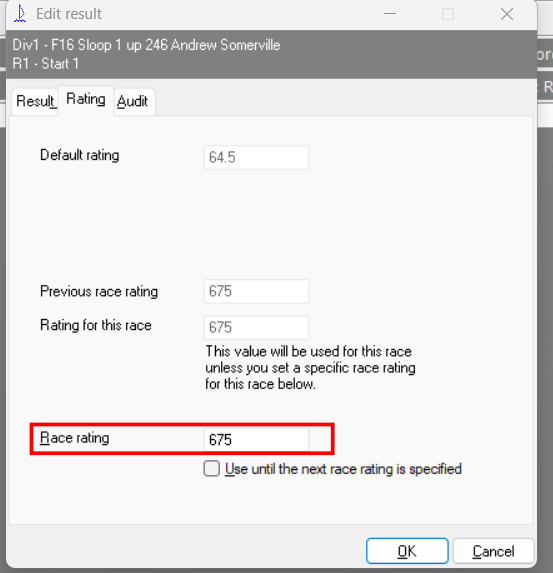
I have imported results from a test race using DSRC android app, which has worked well up till now.
this time however the ratings in sailwave are shown as AS, ie out of 100, but the results htm file shows them as PYN numbers, 10 x what they should be. I imported the results from the csv file exported from DSRC, which has the PYN numbers in it but they are stored in the field ‘R a t i n g‘ to prevent them being used in sailwave
the AS ratings are in the file set in sailwave in setup, global optioins, folders, which have the correct ratings, as shown in sailwave, but they come out wrong in the htm file.
You seem to have used File | Import results from CSV and as the results file contains a column called Rating, Sailwave imports this value into the rating to be used for this race field. Since Sailwave v2-28-7 this has been available.
To clear the unwanted ratings you will have to create a new race and delete the existting race and then reimport after either rename rating column in CSV to something like ‘DSRC Rating’ or mark Rating as IGNORED on mapping window of import process.
I notice you have the NewRating column published so have you been using this file with Progressive Handicap
I see Huw has pointed out that you have rating defined in the csv file and I guess you are importing this as you certainly have a rating override specified. If you press F6 then R you will see these in the UI
You can delete these by double clicking on the top competitor results and viewing the race rating. Hit Backspace to clear it and enter to save it
Now repeat down Arrow - Enter - Backspace - Enter to clear all the other competitors. - Only takes 1 minute to clear all the ratings
I notice you have the Autoset competitor ratings box ticked in the Ratings tab. I recommend that you never leave this ticked only tick it when you wish to read them from a different file then once you have scored the series untick the box don’t leave it permanently ticked.
You have R1 set as record as place
You have races of only a few seconds length - sure this can’t be correct
You are publishing Boat and NewRating but not using them
You have your event Burgee and Venue Burgee defined as image on your local machine
Hope this helps - if you still have a problem please let us know and someone will help you
I had that problem before, so It now is called ‘R a t i n g‘ with spaces between the letters, and it was set to IGNORE in the import dialogue.
I had cleared the R1 result, but not deleted the race.
I did click on the place in the R1 column, and the Race Rating was 675 as you showed, but it showed 67.5 in the AS column, which I assumed would be used, but under AS in the published results it showed 675.
I deleted R1 and it created a new R1, then imported again and it was fine.
My problem was that the actual rating used, which must have been stored inside SailWave for R1 but was not shown unless you clicked in the R1 column after scoring, so the problem was somewhat hidden.
I based the race on a previous series which had a Progressive Handicap, so I turned New Rating columns off.
This was a test race as I said, before the real thing.
Our club files are on Google Drive so they are replicated on everyones machine.