Our Fall Portsmouth Series had the first 4 races cancelled due to weather or no wind. When I publish using results, the summary table does not show the un-sailed races since there were no competitors are marked sailed (All competitors marked excluded since none have sailed). Once a race is sailed (at least 1 competitor is not marked excluded) all of the un-sailed races will show in the summary table. This phenomenon only manifests when the cancelled/un-sailed races are the first ones in the series. Other than forcing a competitor to show in the results via a score or rescore (e.g., showing the excluded racers or adding a non-excluded “dummy” racer), is there a way to have the summary table show the races? The individual races show properly below the summary table.
Hi Tom,
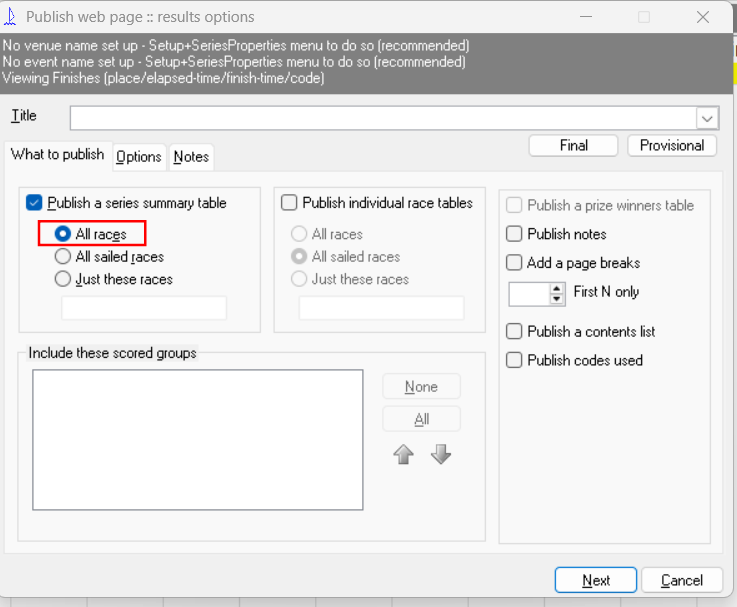
On the first publishing window in the Series summary option what happens when you select the option All races?
Kind regards,
Huw
Thnks Huw for the suggestion, but I already had that selected. Attached is the blw.
Tom
2026_Port_Fall_Low_Points(Application Status)..blw (35.8 KB)
Hi Tom,
Sailwave is working correctly, as there are no results and no competitors (*
*.excluded) no series information to publish.
A work around is to create two dummy competitors, one in each of the Laser and Port fleets, leaving all competitor information blank except the appropriate fleet name. Create an Alias of one of them, then change the fleet name to overall.
When you publish you will get
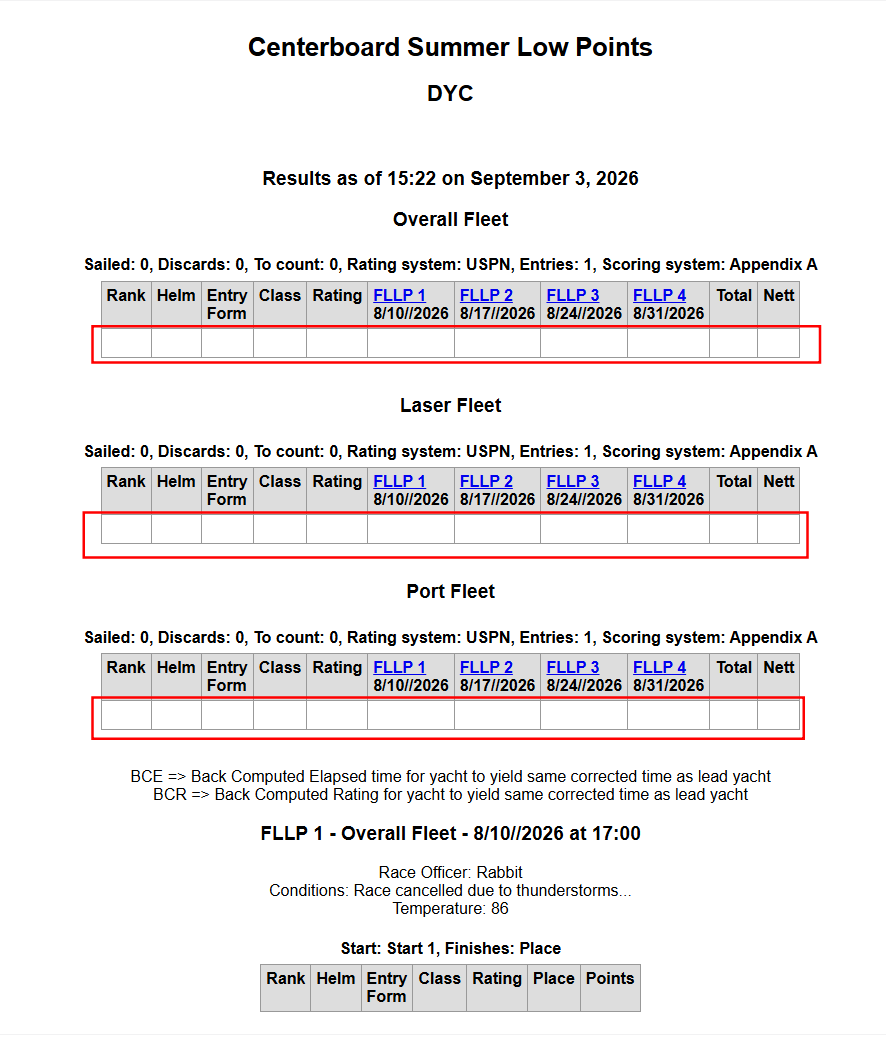
When you have some actual results those 3 ‘dummy’ competitors can be deleted.
I hope t hat helps you.
Kind regards,
Huw
Huw,
I did that earlier and it works. I was hoping there was a setting in lieu of creating the dummy competitors.
Thanks and have a great day,
Tom
Huw and Jon,
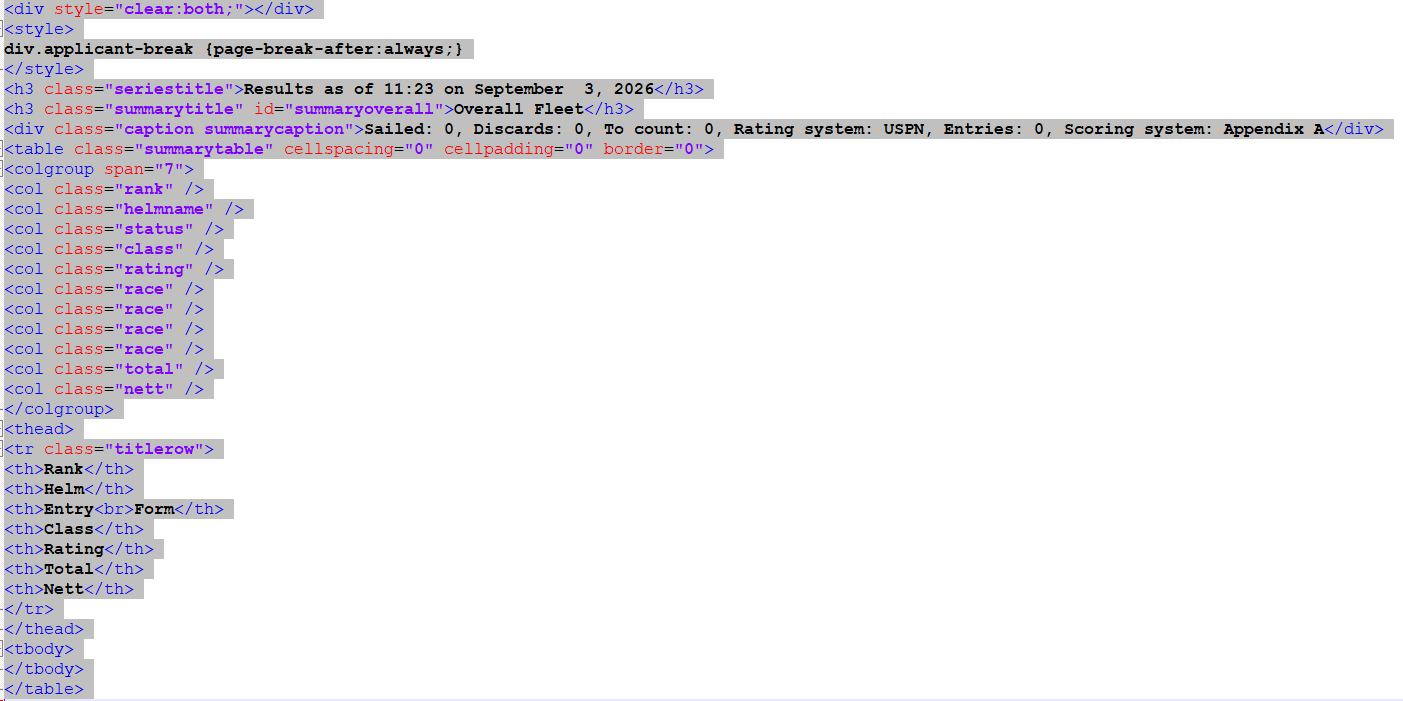
I believe that the HTML created by Publish → Results is bad, When you look at the actual HTML there are ‘’ defined for the 4 races, but there are no ‘<th…>’ for them. This is inconsistent and confusing to any post processing scripts. For example, the segment below shows the inconsistency. As a minimum I would expect there to be the same number of “th” as “col” that would contain the same information (race name and date) if the race had at leat 1 non-excluded competitor.
Am I missing something?
Thanks,
Tom
div.applicant-break {page-break-after:always;}Results as of 11:23 on September 3, 2026
Overall Fleet
| Rank | Helm | Entry Form |
Class | Rating | Total | Nett |
|---|
Sorry, but the HTML expanded to visual html. The raw HTML would be (between the
and
div.applicant-break {page-break-after:always;}

Results as of 11:23 on September  3, 2026
Overall Fleet
Sailed: 0, Discards: 0, To count: 0, Rating system: USPN, Entries: 0, Scoring system: Appendix A
| Rank | Helm | Entry Form |
Class | Rating | Total | Nett |
|---|
How do I get the raw HTML to show as regular text and not what the HTML displays? Sorry.
Tom
Post an image instead.
Richard
Hi Tom
I tried it and it works fine.
I can’t believe that the code you have posted would display correctly
If you have a file that generates that code, attach the .blw, and I’ll have a look at it, but this is an example of what I get
And to answer your question of how to post the HTML, you can click the + symbol and select preformated text
Jon
<colgroup span="19">
<col class="rank" />
<col class="tally" />
<col class="fleet" />
<col class="division" />
<col class="nat" />
<col class="sailno" />
<col class="altsailno" />
<col class="helmname" />
<col class="helmagegroup" />
<col class="helmsex" />
<col class="race" />
<col class="race" />
<col class="race" />
<col class="race" />
<col class="race" />
<col class="race" />
<col class="race" />
<col class="total" />
<col class="nett" />
</colgroup>
<thead>
<tr class="titlerow">
<th>Rank</th>
<th>Tally</th>
<th>Fleet</th>
<th>Division</th>
<th>Country Code</th>
<th>Sail No</th>
<th>AltSailNo</th>
<th>Full name (Sailor)</th>
<th>HelmAgeGroup</th>
<th>Gender (Sailor)</th>
<th>R2</th>
<th>R4</th>
<th>R7</th>
<th>R8</th>
<th>R9</th>
<th>R12</th>
<th>R14</th>
<th>Total</th>
<th>Nett</th>
</tr>
</thead>
Jon,
Attached are the blw and generated html using Publish → Results.
Tom
(attachments)
2026_Port_Fall_Low_Points(Application Status)..blw (37 KB)
2026_Port_Fall_Low_Points.htm (5.81 KB)
Hi Tom
The blw had all the competitors marked as excluded so I unticked the hide excluded and rescored and published and it looks fine
<colgroup span="11">
<col class="rank" />
<col class="helmname" />
<col class="status" />
<col class="class" />
<col class="rating" />
<col class="race" />
<col class="race" />
<col class="race" />
<col class="race" />
<col class="total" />
<col class="nett" />
</colgroup>
<thead>
<tr class="titlerow">
<th>Rank</th>
<th>Helm</th>
<th>Entry<br>Form</th>
<th>Class</th>
<th>Rating</th>
<th><a class="racelink" href="#r1overall">FLLP 1</a><br />8/10//2026</th>
<th><a class="racelink" href="#r2overall">FLLP 2</a><br />8/17//2026</th>
<th><a class="racelink" href="#r3overall">FPLP 3</a><br />8/24//2026</th>
<th><a class="racelink" href="#r4overall">FLLP 4</a><br />8/31/2026</th>
<th>Total</th>
<th>Nett</th>
</tr>
</thead>
Hope that helps
Jon
Jon,
I really appreciate your interest and potential solutions. As you and Huw(and me earlier) showed, if there is at least 1 non-excluded competitor, then the race columns are added in the Summary table. However, our situation is that all competitors are excluded for the current 4 races in the series since none actually raced. Once a competitor actually races, all of the “” will show. Having a dummy competitor that is not excluded requires that competitor to be deleted or excluded once there is a valid competitor for the codes for DNC will be incorrect. This add additional complexity for the scorer. My goal was to have a blank summary with the links to the individual scored races shown the in the summary table without the scorer remembering to artificially include or exclude dummy competitors..
We post process the generated HTML to create responsive tables that show better on small screens. While ti may be superficial, the notes for the races explain who was RO and the conditions for cancelling the races. Without the links to the individual race data, the files and links to them will not be created. Please look at the results in DYC Centerboard Results to see the Spring or Summer series vice the Fall series. The Summary table should contain “” for all of the races (assuming include all races is selected in the publish screen). The generated HTML as currently generated is inconsistent. Am I missing something here?
Tom