Let me start by saying I’m not a programmer (nor a ‘sailor’).
Maybe sailwave already does what I tried to accomplish with a click of a button, maybe not. Who knows, maybe this helps someone.
So, here’s the background story:
My nephew got in a ILCA class national competition, and I noticed the classification page (link) had only 2 results tables (ILCA 4 & ILCA 6), but there were at least 2 or 3 age divisions on each table, all mixed up.
I wanted to know (1) how he performed within his age group, and (2) within his club, and it was not easy to filter that from a list of ~110 competitors.
So I asked Chatgpt for help.
The result is a small script that fetches the competition results from the official Sailwave results page, processes the data, and generates a new static HTML page containing the original tables and several derived rankings - e.g. by age group, club, and global competition club ranking.
I put both the script and the css styles on github for anyone to try/use, with the following explanation:
This project retrieves official sailing race results published in Sailwave format and automatically generates a clean, static HTML report with consolidated classifications.
What it does:
Scrapes official Sailwave result tables directly from the event website
Supports multiple competitions (ILCA 4 and ILCA 6, but can be changed )
Preserves original official tables for reference
Computes:
Individual rankings by division (age category)
Individual rankings by yacht club
Collective club rankings (Top N sailors per club)
Overall club ranking across competitions
Highlights Top 3 positions visually
Generates a single navigable HTML page with internal links
Uses an external CSS stylesheet for easy customization
Output is fully static and works offline
The generated HTML file is saved to the output/ directory:
Welcome to the Sailwave User Group forum and thank you for your useful contribution.
When I open your script I get a module not found message:
ModuleNotFoundError                       Traceback (most recent call last)
Cell In[1], line 2
1 import os
----> 2 import requests
3 import pandas as pd
4 from bs4 import BeautifulSoup

ModuleNotFoundError: No module named ‘requests’
I will do some investigation of my set-up to see if it is my local environment (Linux openSUSE Tumbleweed). [Update - it is something about my local environment.]
FYI - there is a way the person doing the results could have helped when they published the original results. Sailwave has the capability when publishing of including some code (JavaScript) that allows those viewing the results to alter the order the results are shown. An icon is added to the header of each column of the results table, this icon when clicked sorts results on that column, keeping the overall rank. More than one column can be selected using the CTL + click another column icon.
FYI - I have installed Python from the python.org site using the Python install manager 25.2 MSIX version on my Microsoft Windows 11 system. It could have been installed by visiting the Microsoft App store but the Python version is not so up to date.
This allowed the Python script Alieri has made available to be run.
I also was able to run the Python script I have written to extract data from a Sailwave created JSON file and put the extracted data into an SQLite database. See more in formation in the SUG forum thread Turnout and other Analytic Statistics - #15 by huw .
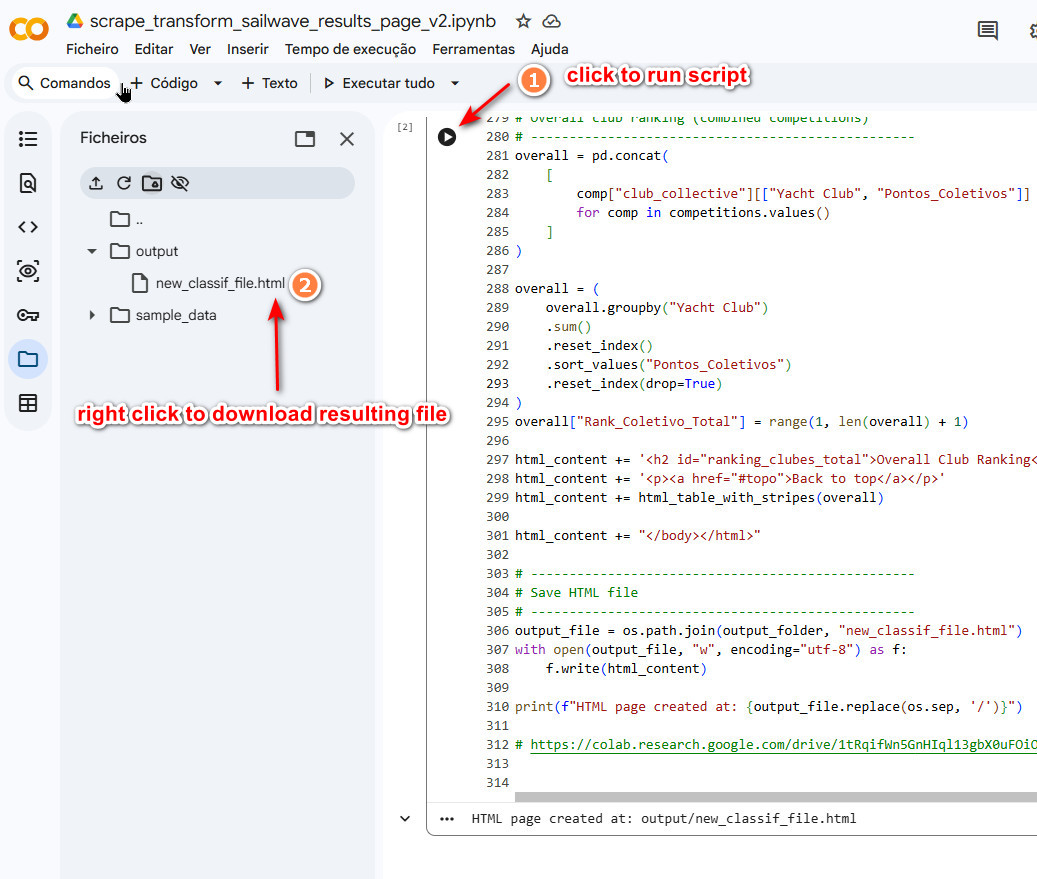
It may also be possible to have the script run on Google Colab.
No software install required.
This way you only need to have internet access.
Can you please check this link? I hope I made it public access.
this is the same script as before, but now no external styles file is created, meaning your just download the resulting html file and share it somewhere.
I attach a picture of Google Colab and how to use. (note the folder icon on the left vertical bar. That’s where the resulting files go)
Regarding your information on the ability of creating sortable tables on sailwave , I’m sure it does that, although I can’t test it.
Still, I have put a 2nd script on google colab (same link, just scroll down) that grabs the original tables and makes them sortable. Creates a new html file called “classif_sortable_tables.html”
I feel this disclaimer is needed - This script is provided for informational and analytical purposes only. Official results should always be verified directly on the source website.
Well done on your follow-up code to dd sorting to column.
Unfortunately, I have noticed a small issue when sorting a race column. Results that are discard, i.e. have brackets around, show in the list before non-discard races.
I have not looked at your code to see if I can suggest some revised code.