Hi There.
66 OPTIMIST class boats series, divided in 2 classes - VETERANS & ROOKIES - and 3 age divisions in each class. Used Google Forms to register for the regatta and saved the entries as a CSV file. Then imported competitors to Sailwave. All gone well.
When began to enter the results just typing the sail number, what happened:
- no problem in position assignment occured when entering Rookies’ class sail numbers.
When entering Veterans’ class sail numbers, position assignment behaved in an erratic manner:
- after filling the sail number for some boats and pressing ENTER, the position assigned was lower than the real sequential position within Vets class; had to manually enter the real position to correct them;
- sequentially, some following filled in sail numbers, after pressing ENTER, had their real positions correctly assigned;
- then, some next numbers, again were incorrectly assigned by SW and hat to manually force the real possition.
Having this strange behavior occured, and if you suspect one of more causes, what could be done to “sanitize” the Google Forms CSV file and the BLW file itself?
Looking forward to your wisdom, I thank you.
Yours Renato.
Hi Renato,
As somebody who uses SW extensively and has even written programs to create BLW files on the fly I can tell you that I’ve never seen data corruption.
Would you be able to share your version of the BLW file after the competitor import and the results sheet? I can try to investigate the problem.
Peter
Hi Renato,
As Peter said, it is very unlikely to be corruption. But to understand what is happening in your case, it is difficult to comment without seeing your files. How did you define the starts for the race? Sailwave will automatically increment the numbers separately for different starts, and the number will be one greater than the largest number for that start. As an example if you tell Sailwave the first boat is position 101, then the second boat in that start will get 102. But you must understand the difference between positions and points. When you score this example, the boat with position 101 will get 1.0 points, and the boat in position 102 will get 2.0 points.
Look forward to seeing your files.
Hi Renato,
As Peter & Jon have said sharing your files would help with sorting out the problem. In addition to the Sailwave file it would be useful to have the CSV file you used to import the competitor data into Sailwave.
Kind regards,
Huw
Hi there !
Thanks for returning.
Please find the BLW file.
After reading JON’s suspicion on “starts” defined, I am quite sure that was the reason.
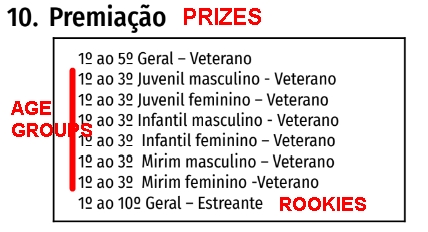
I iniatially defined various “starts” for veteran sailors, according to prize list, more numerous for that class:
- VETERANS OVERALL
- VETERANS MIRIM (age group informed on GForms entry)
- VETERANS INFANTIL (age group informed on GForms entry)
- VETERANS JUVENIL (age group informed on GForms entry)
It seems that these “starts” conflicted with each other and may have cause that odd behavior.
Then, suspecting that this may have been the reason, I deleted all “age related starts”, keeping only the OVERALL STARTS: VETERANS and ROOKIES.
If that be the reason, how to set up “starts” so I can produce all results separatedely:
- the class overall result
- each age category within rthe same class (i.e. VETERANS)
Thanks for your support.
Hi Renato,
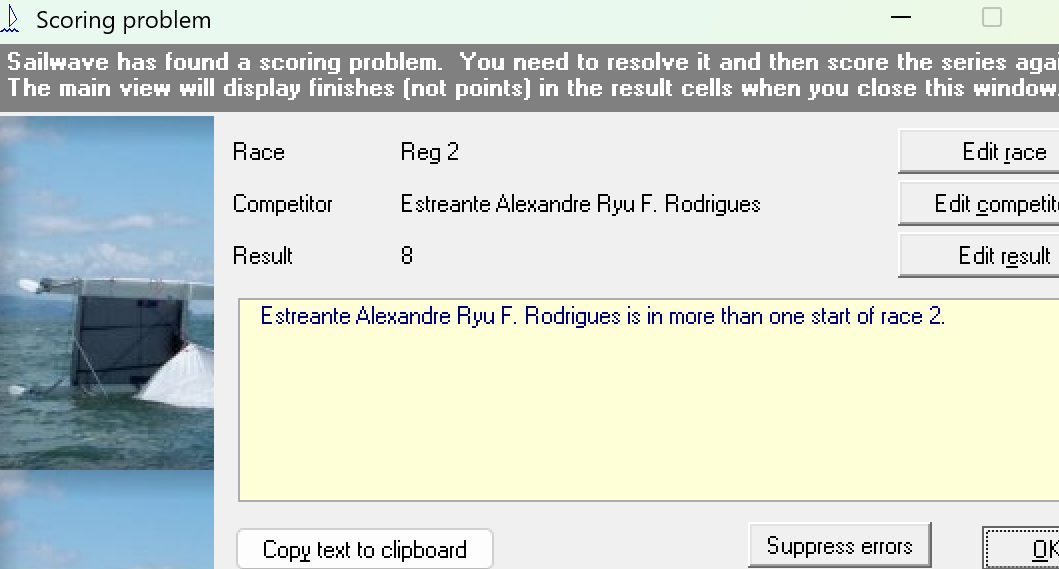
If you score the file you supplied you do get a message about the starts being incorrect
You need to correct the starts before you can correctly score. The starts for R1 seem to have been corrected but not R2
The starts should reflect the way you actually start them. Each Sailor can only be in one start and all Sailors must be in a Start
To understand how the prizes are calculated I would need to see the NoR and SI’s
Are they scored as individual groups or are the points extracted from the overall?
Regards
Jon
Thanks Jon.
PRIZE LISTattached