I am new to Sail wave and doing my best to figure it out. As the local language is not English we do have some special characters that get scrambled when importing the CSV file - is there a way around that or do I have to go through all the names and retype them?
Hi Ulfur,
Firstly welcome to the Sailwve User Group forum.
What is your local language? This might help with an answer.
If you send me your CSV file containing special characters (huw@sailwave.com). I will see if I can come up with a solution.
Kind regards,
Huw
Hi Ulfur,
You don’t say where the CSV is being generated from - If you can get the csv saved in ANSI format and it should be OK. If you can’t, it’s not a problem
You may already have the Windows program Notepad++ but if you don’t, you can download it free of charge from here: Notepad++ downloads. Open the csv with Notepad++, and then click on Encoding, and then convert to ANSI, and save the file.
,
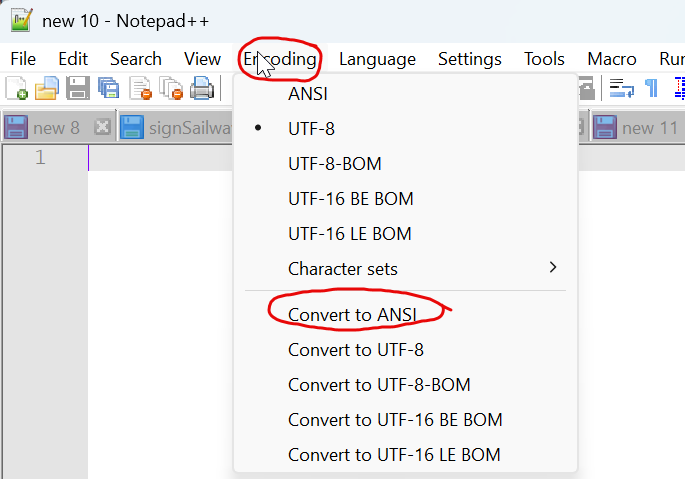
You can now import the CSV, and you will probably be fine - if you do still have an issue, please let me know with an example of the CSV
Hope this helps
Jon
1 Like
I second the recommendation to save the csv file as ANSI before importing into Sailwave. It’s worked for me with competitors from a lot of European countries. I prepare my files in a python script so I have full control over the output. I discovered that I also need to strip emojis from club and boat names as those cause some interesting text.
The default Windows notepad on my Win 11 computer has an encoding option to save as ANSI.
I would be cautious about Notepad++ right now as the source code was compromised for a time. See Notepad++ Hijacked by State-Sponsored Hackers | Notepad++
Eileen
Hi Eileen,
Yes, if you can fix an issue at the source, it is far better. The Issue with Notepad++ was not that the source code was compromised; it was an issue with the hosting provider for online updating being compromised, which can happen to anyone. I feel sorry for them, as it was not something they did wrong. There hasn’t been an issue if you always download from the supplier. They have switched the hosting supplier for updates, so that should be secure now as well. So I think it’s a safe as anything can be to use now. When I have a few minutes to spare, I will build a routine into Sailwave that converts any non-ANSI encoded files to ANSI automatically as they are imported.
Jon
Thank you all for your help. The ANSI in windows notepad helped and I am all good now.
kind regards
Ulfur
1 Like